

Lionel FasTrack was introduced in 2003 and has become Lionel’s most popular track system. It is easy to assemble, works on almost any flat surface, and has a more realistic appearance than Lionel’s traditional tubular 3-rail track.
One of the biggest advantages of FasTrack is the huge variety of curves, straights, switches, crossings, and specialty track sections available. Whether you are building a simple starter loop or a large multi-train Lionel layout, FasTrack gives you almost endless layout possibilities.
At the same time, FasTrack can be a little confusing for beginners. Understanding how the different curves, angles, switches, and fitter sections work together is the key to building layouts that line up properly and run smoothly.
This guide provides a basic introduction to Lionel FasTrack, explains what the different pieces do, and shows how they fit together in real FasTrack layouts.
Lionel FasTrack - An Overview
Did you listen in math class? If the answer is yes, good — because a little basic geometry comes in handy when planning FasTrack layouts. (If the answer was “no,” just read this article twice and then take the 100-question test at the end — just kidding.)
FasTrack is a rigid track system, which means the sections cannot be cut or shortened. Instead, Lionel designed a wide range of track pieces to meet almost any layout need. Knowing how those pieces interrelate is one of the keys to planning and building successful FasTrack layouts.
The most important concept when working with FasTrack is understanding the angles. Most FasTrack curves and crossings are based on 90°, 45°, 22.5°, and 11.25° increments. O48 curves are the exception, using 30° sections instead. Once you understand how those angles work together, planning custom FasTrack layouts becomes much easier.
FasTrack Curves
FasTrack curves come in several diameters for everything from starter loops to broad-radius O Gauge layouts. When planning a Lionel FasTrack layout, pay attention to three things: curve diameter, sections needed for a full circle, and the angle of each piece.
Most FasTrack curves use 45°, 22.5°, or 11.25° increments, which helps O36, O60, O72, and O84 curves work together in custom layouts. O48 curves are the exception, using 30° sections instead.
#12015 O36 Curve

- Sections 8
- Turn 45°
- Diameter 3 foot
O36 curves are commonly included with Lionel starter sets. Half sections make a 22.5° turn, and quarter sections make an 11.25° turn.
#12043 O48 Curve
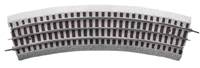
- Sections 12
- Turn 30°
- Diameter 4 foot
O48 uses 30° sections, which can make it harder to combine with other curve diameters in partial turns. It is useful when you need a broader curve than O36 but less space than O60.
#12056 O60 Curve
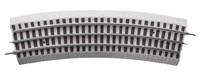
- Sections 16
- Turn 22.5°
- Diameter 5 foot
A popular wider-radius curve for layouts that need smoother operation and a broader appearance than O36.
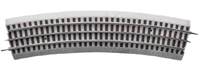
#12061 O84 Curve
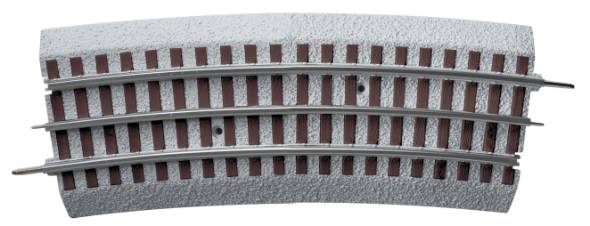
- Sections 32
- Turn 11.25°
- Diameter 7 foot
Broad-radius curves designed for large layouts and longer passenger or scale-sized equipment.
FasTrack Straights
FasTrack straight sections keep layouts lined up and make it easy to add sidings, yards, and longer mainline runs. The standard 10 inch straight (#12014), 5 inch straight (#12024), 30 inch straight (#12042), and shorter fitter sections all serve different spacing needs.
The shorter fitter pieces are especially useful around crossings, switches, and complex FasTrack layouts where small differences in length matter.
#12014 10" Straight

- Length 10"
- Use Standard straight section
The standard FasTrack straight section used in most layouts and starter sets. Many specialty sections are also built around this 10 inch length.
#12024 5" Straight

- Length 5"
- Use Half straight section
Useful when adding special track pieces, crossings, switches, and compact layout sections. It also works as a half section for smaller spacing adjustments.
#12025 4.5" Straight
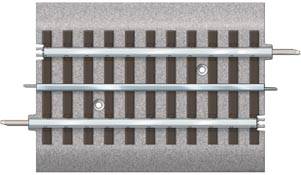
- Length 4.5"
- Use Fitter section
The 4.5" fitter section helps compensate for crossing geometry and odd-length track combinations, especially where a 5 inch section is just too long.
#12026 1 3/4" Straight

- Length 1 3/4"
- Use Short fitter section
Used to close small gaps and fine tune complex FasTrack layouts.
#12073 1 3/8" Straight

- Length 1 3/8"
- Use Short fitter section
One of the smallest FasTrack fitter sections for precise spacing adjustments.
#12074 1 3/8" Straight Without Roadbed

- Length 1 3/8"
- Use Low-profile fitter section
This version does not include the molded FasTrack roadbed.
#12042 30" Straight

- Length 30"
- Use Long straightaways
A long straight section that reduces joints on large O Gauge layouts and mainline runs.
FasTrack Switches
FasTrack switches, also called turnouts, let trains move from one route to another. They are designed to fit standard FasTrack geometry, making them useful for sidings, yards, passing tracks, and expanded layouts.
Most switch footprints combine the space of a straight section and a matching curve. All FasTrack switches come in left-hand and right-hand versions, with O36 available in manual or remote control and larger-radius switches available as remote switches.
#12017 / #12018 O36 Manual Switch

- Control Manual
- Curve O36
- Available Left and right hand
Hand-thrown switch for sidings, yards, and basic layout expansion. The O36 switch matches the footprint of one 10 inch straight and one O36 curve.
#12045 / #12046 O36 Remote Switch

- Control Remote
- Curve O36
- Available Left and right hand
Remote-control O36 switch with a wired controller for changing routes from the control area. The curved route includes a removable 1/4 curve section (#12023).


FasTrack Crossings
FasTrack crossings let two routes intersect while keeping the track geometry aligned. Lionel offers 90 degree (#12019), 45 degree (#12051), and 22.5 degree (#12050) crossings for figure-8s, reverse loops, multi-track mainlines, and more complex track plans.
These angles are multiples of one another, so they work naturally with most FasTrack curve sections.
#12019 90° Crossing

- Angle 90°
- Use Perpendicular track crossings
The standard square crossing used where two FasTrack routes cross at right angles. Its 90° angle equals two 45° crossings.
#12051 45° Crossing

- Angle 45°
- Use Figure-8 and reverse-loop layouts
A common crossing angle for figure-8s, reverse loops, and diagonal routes. Its 45° angle equals two 22.5° crossings.
#12050 22.5° Crossing

- Angle 22.5°
- Use Advanced custom layouts
A lower-angle crossing for more complex layouts and track plans. Its 22.5° angle matches many FasTrack curve combinations.
Special Track Sections
Lionel FasTrack includes several specialty track sections that handle power connections, uncoupling, accessory activation, block control, bumpers, and grade crossings. These pieces are designed to drop into a layout while keeping the same basic FasTrack geometry.
#12020 Uncoupling Track

- Length 5"
- Use Magnetic uncoupling
Includes a magnet that activates Lionel couplers automatically. This 5 inch section is useful in yards, sidings, and switching areas.
#12054 Operating Track
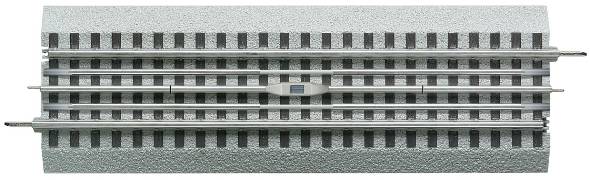
- Length 10"
- Use Operating cars and uncoupling
Includes a central magnet and special control rails that activate Lionel operating cars equipped with slide shoes. This section is 10 inches long.
#12016 Terminal Track

- Length 10"
- Use Transformer connection
A 10 inch straight section with wires to connect track power from the transformer. Starter sets commonly include a terminal track section.
#12060 Block Section

- Length 5"
- Use Isolated power blocks
Allows you to isolate power between sections of track, such as two loops using separate transformers. This section is 5 inches long.
#12040 Transition Section

- Length 5"
- Use FasTrack to O Gauge tubular track
Connects FasTrack to conventional O Gauge tubular track using FasTrack connectors on one end and O Gauge pins on the other. It does not work with O27 track.
#12029 Accessory Activation Track

- Length 20" assembled
- Use Trackside accessory activation
Uses an isolated outside rail so passing trains can turn compatible Lionel trackside accessories on and off. The activation section is 20 inches long when assembled.
#12027 Accessory Activation Extension

- Length 10"
- Use Activation track extension
Adds 10 inches of length to the accessory activation track section for longer activation zones.
#12035 / #12059 Bumper Tracks

- Versions Lighted and unlighted
- Use End-of-track bumper
Used at the end of spur sidings to keep cars from rolling off and give the track a finished look. Available in lighted (#12035) and unlighted (#12059) versions, sold in pairs.
#12036 Grade Crossing Section

- Length 10"
- Use Road crossing scene
A 10 inch simulated road crossing section for adding scenic detail to a FasTrack layout. Grade crossing sections are sold in pairs.
#12052 Highway Signal Set

- Length 20" assembled
- Use Flashing crossing signals
Adds flashing highway signals to a FasTrack road crossing scene. The set is 20 inches long when fully assembled and takes the place of two 10 inch straights.
#12062 Crossing Gate Set

- Length 20" assembled
- Use Operating crossing gates
Adds operating crossing gates to a FasTrack road crossing scene. The set is 20 inches long when fully assembled and takes the place of two 10 inch straights.
Fitting It All Together: FasTrack Layout Examples
These examples show how FasTrack straights, curves, switches, crossings, and fitter sections work together in real layouts. The red highlighted areas in each diagram point out the key pieces that make the geometry line up.
Double Loop FasTrack Layout With Crossing

This little layout, which we call the Double Loop RR, shows how to fit a crossing into a layout. Take a look at the two parts of the layout outlined in red.
The top leg of the loop, running horizontally across the top, includes 30 inches of straight track: two 10 inch straights plus the straight leg of the switch, which is also 10 inches.
Along the parallel leg in the middle of the layout, there is also a 30 inch straight run, but this one uses five sections of track: one 10 inch straight, one 90 degree crossing, one 5 inch straight, and two 4.5 inch straights. That adds up to 30 inches.
This illustrates the importance of shorter straight sections like the 4 1/2 inch section. Because the crossing is an odd length relative to the other sections, a special piece is needed to compensate and make the loop match up. The vertical loop uses the exact same straight-section arrangement.
This plan requires:
- 6 #12014 10" Straight
- 2 #12024 5" Straight
- 4 #12025 4.5" Straight
- 12 #12015 O36 Curve
- 1 #12019 90 Degree Crossing
- 1 FasTrack LH Switch: #12017 Manual or #12045 Remote
- 1 FasTrack RH Switch: #12018 Manual or #12046 Remote
- 2 #12023 1/4 O36 Curve, included with the switches
Christmas Tree Reverse Loop FasTrack Layout

This second layout, designed to go around a Christmas tree, illustrates the need for half curves to make a plan fit.
At first glance, the plan appears to be a figure-8, but it is actually two reverse loops folded over each other. The top half of the circle is made of six O48 curves. The two switches are O36, one right hand and one left hand. The two crossings are 45 degrees.
Because this plan uses 45 degree crossings, half sections of O36 curves are needed between the switches and the crossing to line the track up properly. Half curve sections are also needed on the outside legs of each loop to close the gap between the turns at the bottom of the layout and the switches.
Those S-turns are needed because the curves at the bottom of the layout are wider than those at the top. A couple short fitter pieces are also used to close small gaps.
This plan requires:
- 6 #12043 O48 Curve
- 12 #12022 O36 1/2 Curve
- 10 #12015 O36 Curve
- 2 #12051 45 Degree Crossing
- 1 FasTrack LH Switch: #12017 Manual or #12045 Remote
- 1 FasTrack RH Switch: #12018 Manual or #12046 Remote
- 2 #12023 1/4 O36 Curve, included with the switches
- 4 #12025 4.5" Straight
- 2 #12024 5" Straight
- 2 #12026 1 3/4" Straight
Folded Figure-8 FasTrack Layout With O48 & O60 Curves

This layout shows how to connect two different curve diameters into one plan. It is a folded-over figure 8 with an O48 inner loop and an O60 outer loop.
Several fitter pieces are used on the O48 loop, outlined in red, to achieve the desired spacing between the back straightaways of both loops.
A pair of O36 1/2 curves, also outlined in red, is used around the 45 degree crossing at the bottom. These are needed because two O48 curves in that location would not line up properly due to the different O48 curve angle.
When designing a layout, it is usually best to start with the most complex section of the plan first and then work your way out. That makes it easier to keep everything aligned when the layout is complete.
This plan requires:
- 18 #12056 O60 Curve
- 12 #12043 O48 Curve
- 2 #12022 O36 1/2 Curve
- 1 #12051 45 Degree Crossing
- 7 #12014 10" Straight
- 11 #12026 1 3/4" Straight
Two-Train FasTrack Layout With Block Control

This layout illustrates the use of block sections to separate two loops of track and create a two-train layout.
The block sections, highlighted in red, separate power between the two loops. The rest of the layout is straightforward, using regular O36 curves plus 10 inch and 5 inch straights.
Two 1 3/4 inch straights are needed: one between the two switches on the inner loop and one on the opposite side of the loop to compensate for the first one.
This plan requires:
- 16 #12015 O36 Curve
- 20 #12014 10" Straight
- 6 #12024 5" Straight
- 2 #12060 Block Section
- 2 #12026 1 3/4" Straight
- 2 FasTrack LH Switch: #12017 Manual or #12045 Remote
- 2 FasTrack RH Switch: #12018 Manual or #12046 Remote
Example #5: Complex FasTrack Layout

In this final plan, the full integration of FasTrack components comes together: switches, crossings, short straights, full curves, and half curves all create an interesting layout with plenty of operating variety.
The layout shows that complex arrangements can be formed with FasTrack. The 1 3/4 inch fitter sections are highlighted in red. The layout has a pair of reverse loops, a continuous loop, and two figure 8s.
Despite the layout's apparent complexity, it uses only three pairs of switches.
This plan requires:
- 19 #12015 O36 Curve
- 10 #12014 10" Straight
- 5 #12024 5" Straight
- 2 #12019 90 Degree Crossing
- 6 #12025 4.5" Straight
- 11 #12026 1 3/4" Straight
- 1 #12073 1 3/8" Straight
- 2 #12022 O36 1/2 Curve
- 1 #12051 45 Degree Crossing
- 3 FasTrack LH Switch: #12017 Manual or #12045 Remote
- 3 FasTrack RH Switch: #12018 Manual or #12046 Remote
- 6 #12023 O36 1/4 Curve, included with switches
Final Thoughts on Lionel FasTrack
One of the reasons Lionel FasTrack has remained so popular is that it makes building O Gauge train layouts easier than ever. Whether you are starting with a small starter set loop or planning a large multi-train railroad with switches, crossings, sidings, and operating accessories, FasTrack gives you the flexibility to expand your layout over time.
The key is understanding how the different curves, straights, switches, crossings, and fitter sections work together. Once the basic geometry starts to make sense, planning custom Lionel FasTrack layouts becomes much less intimidating — and a lot more fun.
If you are ready to continue building your layout, these additional Lionel train resources may help:
- Shop Lionel Trains & Lionel FasTrack Products
- Expanding Your Lionel Starter Set
- O Gauge Train Layouts: Track Plans & Ideas
As your layout grows, experimenting with different FasTrack combinations is part of the fun. A few extra curves, switches, or fitter sections can completely change the way a layout operates and open the door to new track plans and operating possibilities.
Frequently Asked Questions About Lionel FasTrack
What is Lionel FasTrack?
Lionel FasTrack is Lionel’s integrated roadbed track system. Each section has track and molded roadbed built together, making it easy to assemble on a flat surface and useful for starter layouts, temporary layouts, and larger permanent train layouts.
Can Lionel FasTrack be cut?
FasTrack is a rigid track system, so the sections are not designed to be cut or shortened. Instead, Lionel offers many different curve, straight, switch, crossing, and fitter sections to help layouts line up properly.
What do O36, O48, O60, O72, and O84 mean?
These numbers refer to the approximate diameter of a complete circle made from that curve size. For example, O36 curves create a circle about 36 inches across, while O72 curves create a broader circle about 72 inches across.
Which FasTrack curve is best for starter layouts?
O36 curves are commonly used in Lionel starter sets and compact layouts. Broader curves like O48, O60, O72, and O84 require more space but can provide smoother operation and a more realistic appearance, especially with larger locomotives and longer cars.
Can FasTrack connect to older Lionel tubular track?
Yes. Lionel’s FasTrack transition section (#12040) connects FasTrack to conventional O Gauge tubular track. It has FasTrack connectors on one end and O Gauge track pins on the other, but it does not work with O27 track.
What are FasTrack fitter sections used for?
Fitter sections are short straight pieces used to close small gaps and make track geometry work in more complex layouts. They are especially useful around switches, crossings, reverse loops, and custom track plans.
Can I run more than one train on a FasTrack layout?
Yes, but you may need block sections, switches, separate loops, or command-control equipment depending on how you want the trains to operate. FasTrack block sections can help isolate power between different sections of track.